
OpeningTree.com is a free chess opening analysis tool that turns your games into an interactive opening tree so you can finally see what you actually play and how well your openings perform. By pulling games directly from Chess.com, Lichess and PGN files, it gives you a single, clean view of your repertoire and results, and makes opening preparation much faster and more targeted.
What Is OpeningTree.com?
OpeningTree.com is an online platform that aggregates your games and displays them as a branching opening tree, with statistics at every move and variation. Instead of guessing which lines you play most often, you get objective data on move frequencies, scores and critical junctions, based on your own games or the games of any public user you choose.
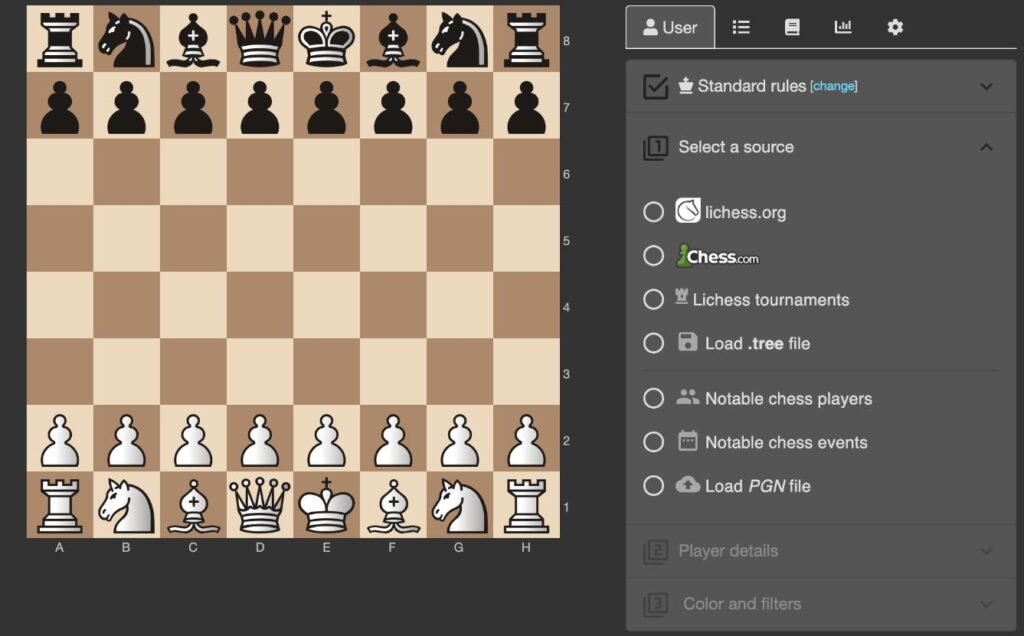
The tool works directly in your browser and is completely free to use: you paste a Chess.com or Lichess username, or upload a PGN file, and OpeningTree builds a full tree of positions and continuations. This makes it ideal for club players, coaches and streamers who want a practical, data‑driven way to study openings and prepare for specific opponents without needing ChessBase or expensive databases.
Key Features of OpeningTree.com
- Consolidated view of your games from Chess.com, Lichess, grandmaster databases or custom PGNs in a single opening tree.
- Win–draw–loss statistics for every move and branch, so you instantly see which openings and sub‑lines work best for you.
- One‑click filters by color, time control and source, letting you focus on blitz, rapid or classical games separately.
- Opponent preparation: build trees from any public username to reveal their repertoire and typical responses before a match.
- Export options so you can download filtered game sets or trees for deeper work in other tools if needed.
These features make OpeningTree.com much more than a simple PGN viewer; it becomes your personal opening scout, showing you how your practical repertoire behaves under real‑game pressure.
How OpeningTree.com Works
When you enter a Chess.com or Lichess username, OpeningTree connects to the platform’s API and downloads a large number of your games, often more than you would comfortably load in a normal game viewer. It then groups them by move sequence and builds a branching tree where each move shows how many times you played it and your score from that position.
You can click through the moves on the board or in the move list to drill down into specific lines and see your personal performance in common openings such as the Sicilian, the French Defense or the Queen’s Gambit. Because the tree is generated from your actual games, it quickly highlights blind spots and critical positions that books and databases may not emphasize for your rating range.
Preparing for Opponents With OpeningTree.com
One of the strongest use cases of OpeningTree.com is opponent preparation. By building a tree from your opponent’s online username, you can see which openings they repeat, what sidelines they prefer, and how they score in critical branches.
This lets you choose practical repertoire lines that steer the game into positions where your opponent historically performs worse, or where they rarely deviate from a predictable pattern. Many tournament players report using OpeningTree.com before each round to quickly review likely openings and refresh key ideas in their chosen lines.
OpeningTree.com vs Traditional Databases
Traditional database programs like ChessBase excel at deep research with millions of games and powerful search tools, but they require installation, licenses and some learning curve. OpeningTree.com, in contrast, focuses on simplicity: it runs in the browser, is free, and emphasizes practical game‑based trees over exhaustive theoretical coverage.
For many club players, this approach is actually more useful because it shows what they and their opponents really play, including blitz and rapid games, instead of only top‑level theoretical novelties. You can still export games for engine analysis elsewhere if you want deeper work, but OpeningTree.com gives you a fast, accessible starting point for understanding your repertoire.
Does OpeningTree.com Have a Mobile App?
OpeningTree.com is built as a web application, so you can access it from a mobile browser on your phone or tablet without installing anything. There are also mobile apps named “OpeningTree – Chess Openings” that provide an opening‑book style experience with trees and statistics compiled from high‑rated games, including engine support.
These apps let you explore well‑known openings and see aggregated win–draw–loss numbers for each continuation, which is useful if you want to study openings on the go. However, the main website remains the best way to analyze your personal online games and build custom preparation against specific opponents.
Pros and Cons of OpeningTree.com
| Aspect | Pros | Cons |
|---|---|---|
| Price | Completely free to use in the browser, no subscription required. | Depends on third‑party APIs; if Chess.com or Lichess change access rules, features may be affected. |
| Data sources | Imports large volumes of games from Chess.com, Lichess, GMs and PGNs in one place. | Focuses mainly on online games; serious OTB players must export and upload PGNs manually. |
| Ease of use | Clean interface, fast filtering, instant tree view of openings and results. | Heavy trees on old devices or slow connections can feel a bit sluggish. |
| Prep value | Excellent for opponent prep and understanding your own repertoire strengths and weaknesses. | Not a full replacement for a professional database plus engine if you need deep theoretical research. |
| Accessibility | Works in any modern browser, including on mobile. | Dedicated mobile apps are separate products and do not yet mirror all web‑based personal‑game features. |
Who Should Use OpeningTree.com?
OpeningTree.com is perfect for ambitious club players, coaches and content creators who want a clear picture of their openings and practical, opponent‑focused preparation. If you regularly play on Chess.com or Lichess, the tool shows you exactly which lines you are scoring with and where you are bleeding points, which makes it easy to prioritize your next study session.
Even advanced players and titled competitors can benefit from OpeningTree.com as a quick scout tool before games, complementing their main databases and engine work. Because it is free, lightweight and fast, there is almost no downside to integrating it into your opening training routine
Why I Choose OpeningTree in My Chess Lessons
When I prepare students for tournaments, I need a tool that shows their real opening repertoire and not just theoretical lines from books, and OpeningTree does exactly that. By importing their games from Chess.com and Lichess, it reveals which openings they actually play, how they score in each branch, and where critical weaknesses appear, so I can design highly focused opening homework instead of generic study plans.
OpeningTree is also perfect for teaching practical opponent preparation, because in a few clicks we can build an opening tree from an upcoming rival’s online games and identify predictable patterns and vulnerable lines. I often combine this kind of targeted opening work with my broader training programs, which you can find on my chess lessons page so students learn how to connect their preparation on OpeningTree with real‑game decisions at the board.
FAQ
What is OpeningTree.com used for?
OpeningTree.com is a free browser‑based tool that turns your online games into an interactive opening tree so you can study your repertoire and prepare against specific opponents.
Is OpeningTree.com free?
Yes, OpeningTree.com is completely free to use in your browser, with no subscription or software installation required.
Which sites does OpeningTree.com support?
You can load games from Chess.com and Lichess via their APIs, and you can also upload your own PGN files to build custom opening trees.
How does OpeningTree.com help with opponent preparation?
By entering an opponent’s online username, OpeningTree shows their common openings and results, making it easier to choose lines that target their weaknesses.
Does OpeningTree.com have a mobile app?
OpeningTree itself runs in any mobile browser, and there are also separate iOS and Android apps that offer an opening‑book style tree with statistics and engine support.
